On Tuesday I went to Lovable's hackathon at their Boston office. I had an amazing opportunity to meet Anton, Fabian and the rest of the Lovable team, and And I asked them a bunch of questions about where the product was going related to browser agents, UX choices, and evals. Anton responded, "Why don't you try to build a Lovable clone and show us the UX for where you think the product should go?"
Two days later, here we are:
System Design
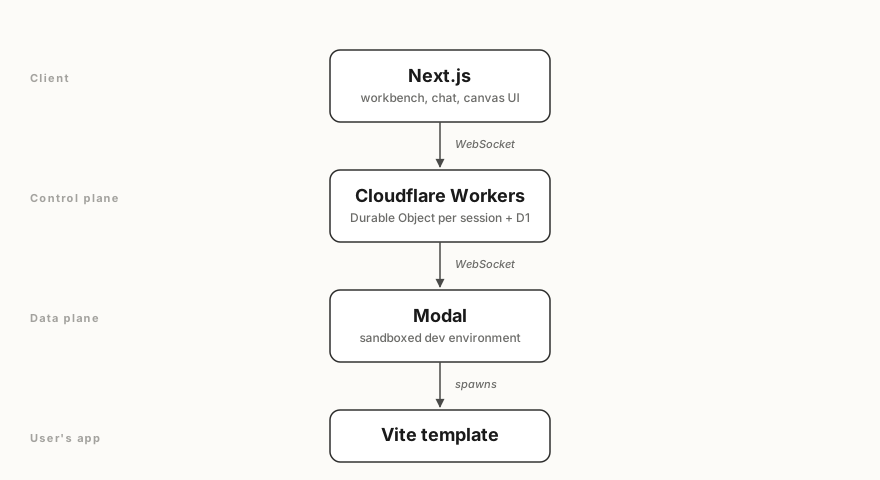
The system design for this project is inspired by Ramp's Inspect agent:
Canvas: New Design UX outside of Chat
The core UX of Lovable is the chat on the left side and the preview on the right. It's elegant because its easy to pick up, but I wanted to explore something that takes better advantages of today's models.
One of my core new workflows has been using Paper to prototype mock designs and variations of designs. I used Paper to quickly snapshot and copy all the core Lovable UX.
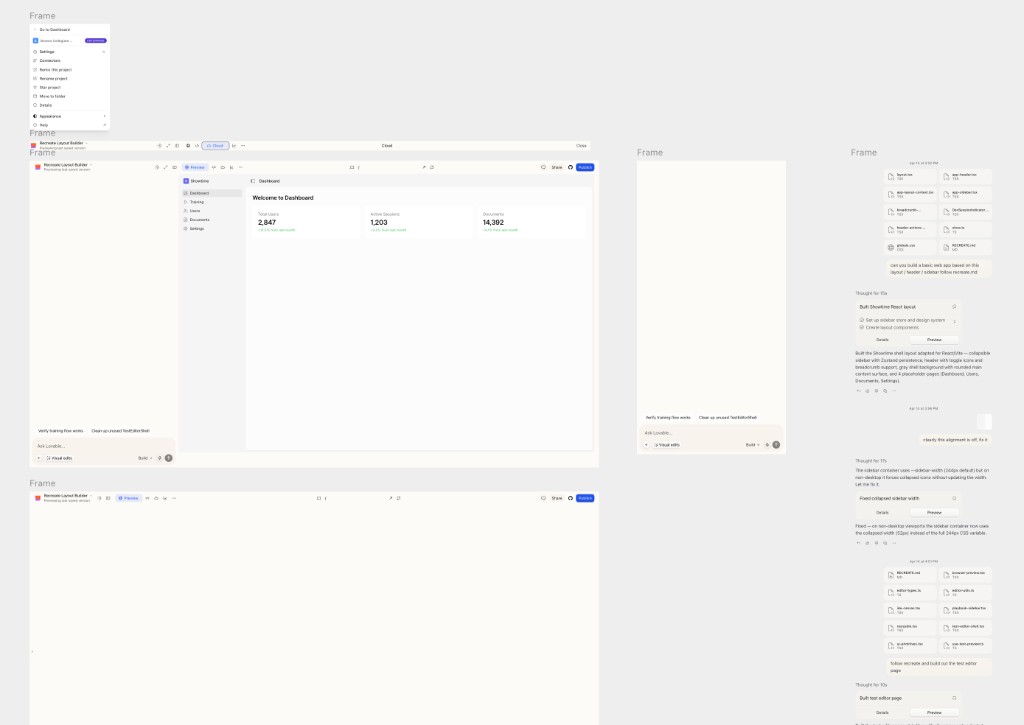
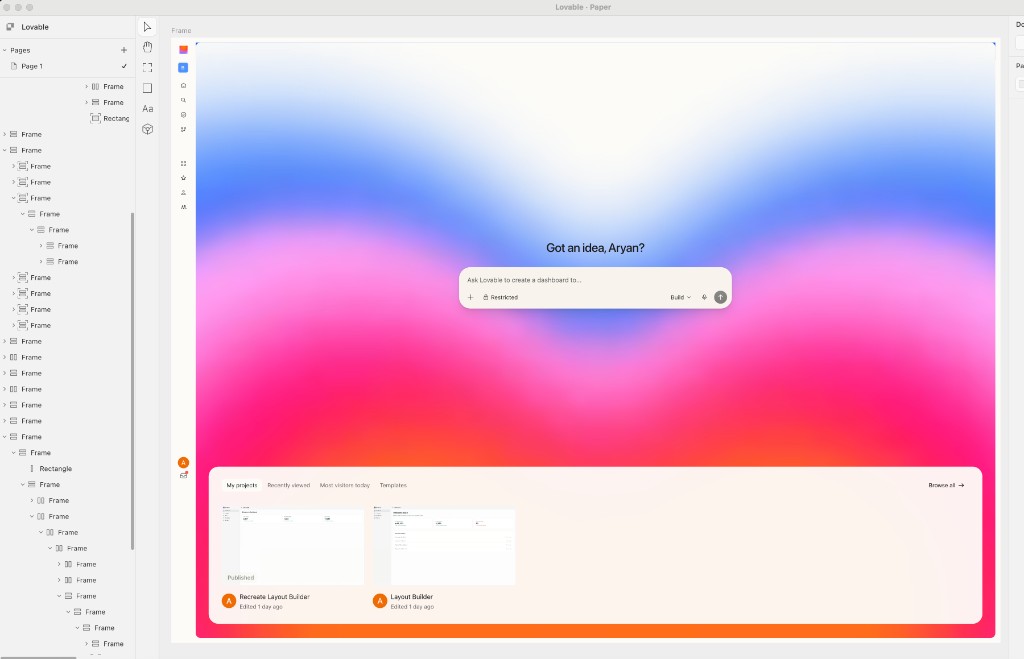
Why don't we bring this Canvas UX and the ability to explore variations of designs to Lovable?
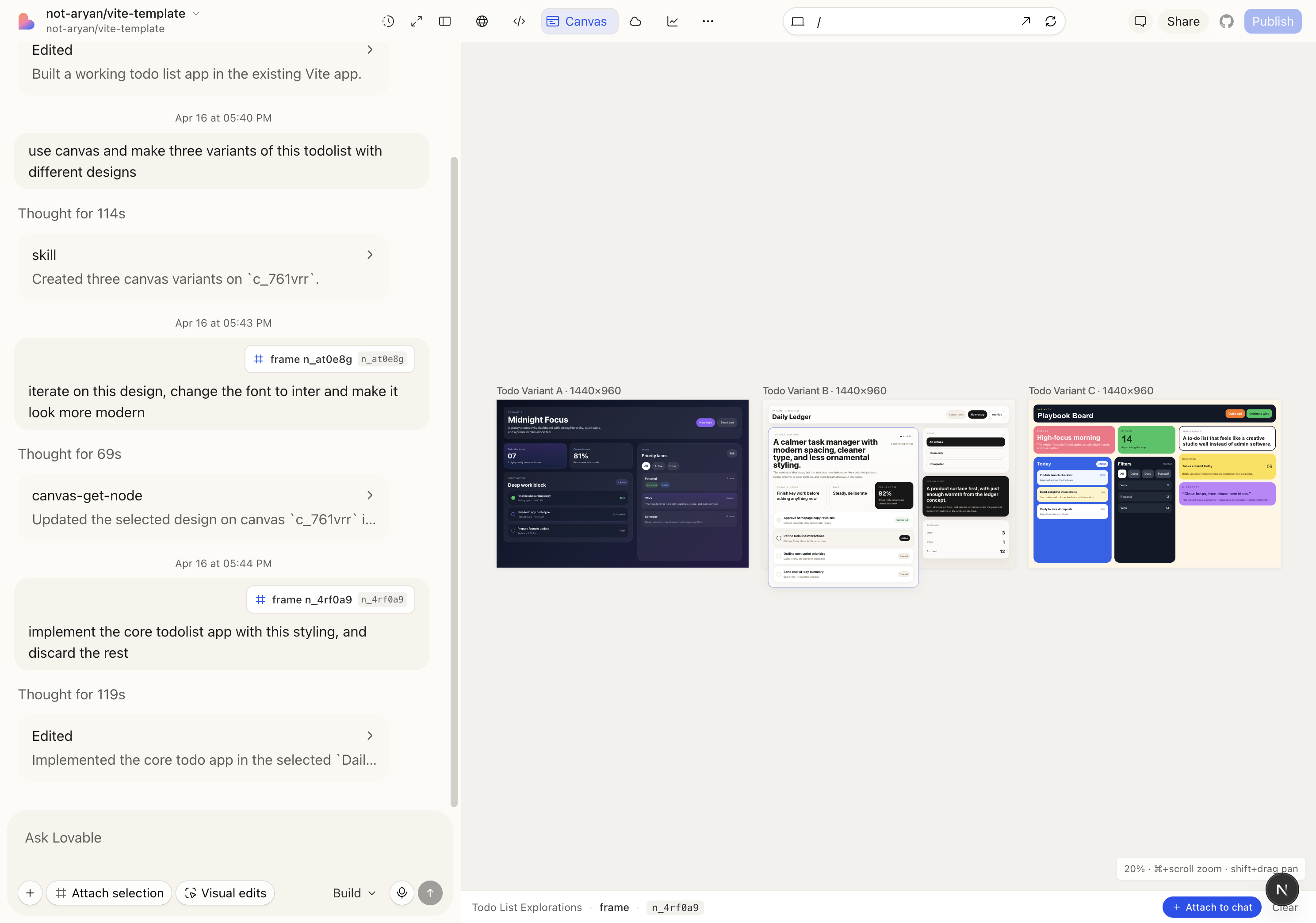
And thats what I set out to do. I wanted the loop to: explore, pick, refine, ship. What I built is Canvas — a shared design surface the agent can write to as naturally as it writes code.
How the canvas actually works
A canvas is just a tree of typed nodes — frame | text | image — each with an inline style dict. No CSS files, no React, no build step. The tree lives in the Durable Object for the session, gets streamed to the browser over the same WebSocket as everything else, and the web client renders it by walking the tree and emitting <div>s with inline styles.
The core design question is: what interface do you give an LLM to edit a tree?
I went through three iterations before landing on the one that worked:
- JSON patches (
{ op: "set", path: "/children/2/style/color", value: "#fff" }). Theoretically minimal. In practice, models drift on paths after a few mutations, and you spend more tokens on addressing than on content. - A scene-graph API (
createFrame,setStyle,appendChild). Better, but too chatty — making a hero section takes 40 tool calls. - HTML-with-inline-styles. Models are already exceptionally good at this. It's one tool call for a whole section. And critically: HTML with inline flex styles is isomorphic to JSX, which means the same string can be parsed into canvas nodes now and pasted into the real codebase later.
canvas-create-artboard   # new 1440×960 frame
canvas-write-html        # drop HTML+inline styles into a frame
canvas-update-styles     # patch styles on existing nodes
canvas-set-text          # replace text
canvas-duplicate         # clone a subtree (for A/B/C variants)
canvas-get-jsx # export a subtree as JSX (tailwind or inline)canvas-write-html is the workhorse. The agent passes a string like:
<div style="display:flex;flexDirection:column;padding:48px;gap:32px">
  <h1 style="fontSize:48px;fontWeight:700">Ship faster</h1>
  <p style="fontSize:18px;color:#9aa4b2">
    Open-Inspect runs your agent in a sandbox.
  </p>
</div>
A parser on the control plane walks that HTML, maps each element to a canvas node (div → frame, h1/p → text), and parses the style attribute into a style dict. The result is a subtree of nodes, which gets committed to the canvas via the op reducer.
Rendering and handoff
The web client renders the canvas by walking the node tree and emitting <div>s with inline styles.
function renderNode(n: CanvasNode) {
  if (n.type === "text") return <span style={n.style}>{n.text}</span>;
  return (
    <div style={n.style}>{n.childIds.map((id) => renderNode(nodes[id]))}</div>
  );
}
The whole canvas is a React tree of real DOM nodes. You can inspect it, you can zoom into it, hot-reload is free.
Handoff to real code is the other direction. When the user picks a variant, the agent calls canvas-get-jsx on that subtree, which emits either inline-style JSX or a Tailwind-ified version. Then the agent uses its normal file-edit tools to drop that JSX into the real Vite source. The canvas is the scratchpad; the codebase is the commit.
Keeping everyone in sync
One small but important detail: every canvas mutation goes through a pure reducer (applyCanvasOp) that lives in a shared package. The control plane applies ops authoritatively and writes them to the session log. The web client applies the same reducer to the same ops, streamed in real time. So the multi-tab case, the reconnect case, and the "replay the last session" case are all the same code path. No CRDT, no diffing — just an ordered log of create_node | update_node | delete_node | move_node | batch ops.
The full round-trip I demoed today was:
- "build a todolist app" → the agent builds a working Vite app.
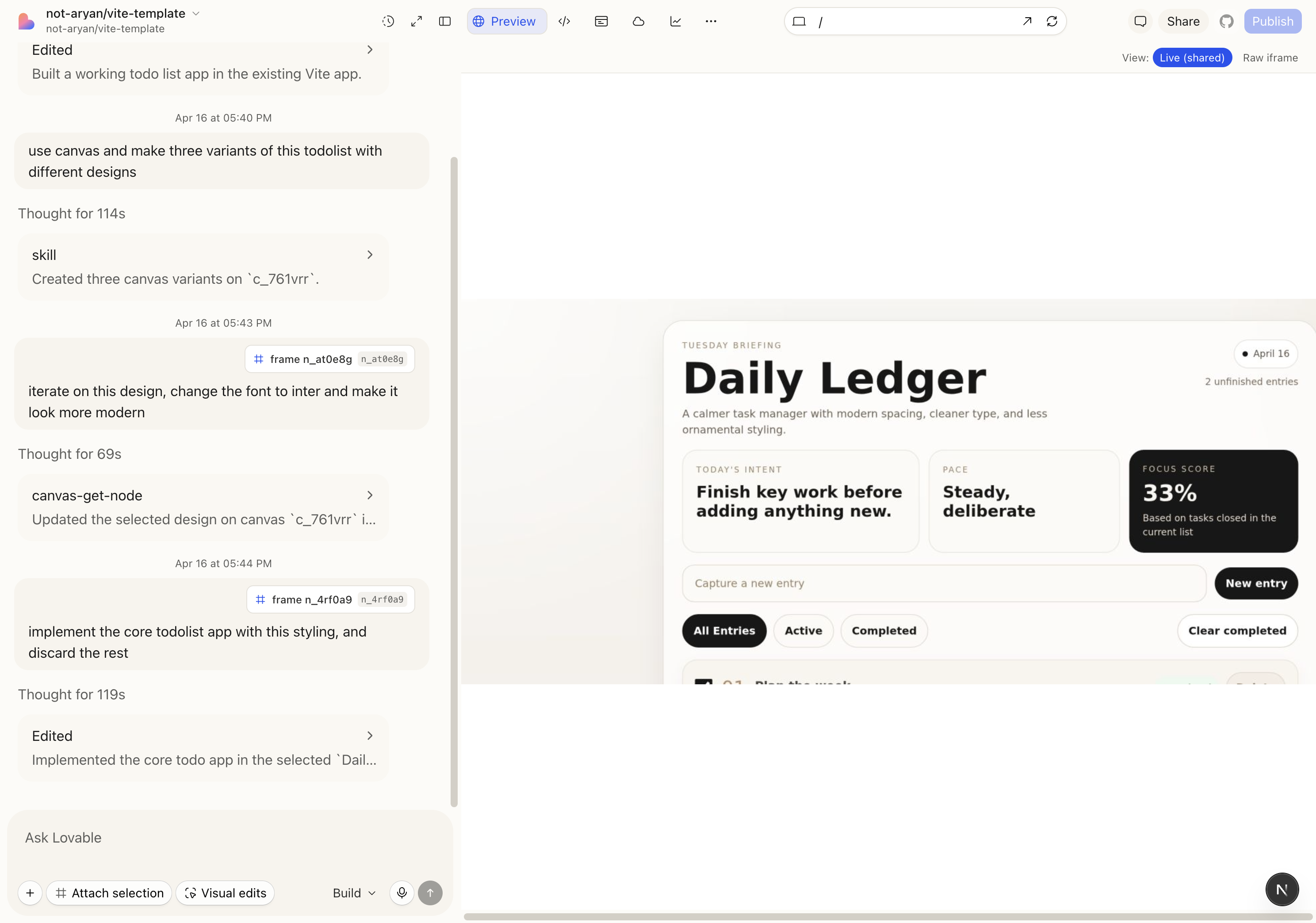
- "use canvas and make three variants of this todolist with different designs" → three artboards appear side-by-side: Midnight Focus (dark, glassy), Daily Ledger (calm, editorial), Playbook Board (chunky, colorful).
- "iterate on this design, change the font to Inter and make it look more modern" — attached the Daily Ledger frame as context — agent refines that artboard in place.
- "implement the core todolist app with this styling, and discard the rest" — agent calls
canvas-get-jsxon Daily Ledger, drops the JSX into the real Vite source, deletes the other variants.
The critical UX detail: you can attach a canvas node as chat context. Click a frame, hit "Attach selection," and the next prompt carries that subtree as structured context. That's what makes step 3 work — the agent doesn't have to guess which design you meant, it has the exact node tree.
Future directions: merging the user's browser with the agent's browser
Today the preview pane has two modes:
- Raw iframe. The user loads the Vite dev server directly. Crisp, fast, interactive. But the agent is blind to it — if the agent "opens" the app, it's in a different Chromium instance.
- Live (shared). The sandbox runs a persistent Chromium via an
agent-browserdaemon. The agent drives that browser (snapshot, click, fill, eval) and we stream the viewport as PNG frames into the workbench over a WebSocket. Now you see what the agent sees. But frame rate is low, input latency is high, and resolution is soft.
The raw iframe is high-fidelity and invisible to the agent. The streamed agent-browser is low-fidelity and fully observable. Neither is right.
The question I kept circling on: How do you put the user and the agent inside the same browser session, at native fidelity, so it's always obvious what the agent is doing?
A few directions I want to try:
- CDP-backed shared Chromium. Run one headful Chrome in the sandbox, expose it over Chrome DevTools Protocol, and have both the user (via a remote-frame canvas or WebRTC) and the agent attach to the same tab. The agent uses CDP for snapshots and clicks; the user sees real DOM updates, not PNGs. Same process, same cookies, same state.
- Inline video snippets in the chat stream. A softer version of the above — when the agent performs a multi-step browser action (e.g. "navigate → fill form → submit"), emit a short video clip into the chat turn. Not a live shared browser, but a much clearer artifact than four screenshots.
- Agent actions as user-visible DOM overlays. Inject a transparent overlay into the iframe that highlights what the agent is hovering, clicking, typing. Even without a shared browser, you'd at least see intent. Cheap, fast, and surprisingly legible.
I want to explore #1 in the future with more time.
What I actually learned
Three things, in order of how non-obvious they felt:
- Agents are better designers than I expected, if you give them a design surface. Writing JSX straight into a codebase is too high stakes. Writing a div tree into a sandboxed canvas is low stakes, and the work is genuinely good.
- The right abstraction layer is "tree of ops." Canvas ops, code diffs, and tool calls are all just ordered events on a session log. Once you commit to that, replay, multi-tab sync, and time-travel are free.
- The preview is the product. People don't remember what the agent said it built or what it did, they remember what they saw. The next order-of-magnitude improvement in this category is going to come from the preview pane, not the LLM.
Hope to see this in a future version of Lovable!